
Showing posts with label 7th Art. Show all posts
Showing posts with label 7th Art. Show all posts

7th Art: Andy Warhol and Pop Art
1. First, go to the PowerPoint presentation and answer the questions on your worksheet.
Pop Art Presentation
2. Use this presentation to answer the questions about artist Andy Warhol.
3. Logo Remix
You will be given a random logo to draw and remix

4. Make lists of possible subjects for your computer artwork.
Pop Art Presentation
2. Use this presentation to answer the questions about artist Andy Warhol.
Andy Warhol on Prezi
3. Logo Remix
You will be given a random logo to draw and remix

4. Make lists of possible subjects for your computer artwork.
Painting and Drawing: Signs for the Edible Schoolyard
We will be painting pictures to be used in signs for the Columbia Heights Edible Schoolyard! Paint with watercolor using the techniques we practiced. It is important to paint the plant or vegetable realistically so that garden visitors know what they are!
Here are some pictures of the Schoolyard:

Here are some examples of garden signs:

Here are some pictures of the Schoolyard:

Here are some examples of garden signs:


Painting and Drawing: The Art of the Advertisement
 Vocabulary
Go to Word Central and look up the definitions to the words on your worksheet. Draw a picture for each.
Research
First we will learn about ads today, then we will create a work of art inspired by vintage hand painted advertisements.
Video: Advertising Art
Ads can be tricky, go to the PBS Kids Ad Detective and follow along on your worksheet.
Then try the other activities.
Watch this vintage Old Spice commercial and answer the questions on your worksheet.
Brainstorm
Ms. Vermeer has given you a random product to create an advertisement for. First you must come up with 4 different ideas for your ad. You can use the internet to research. Each ad must include an original brand name. (You have to make up your own. For example, if you have chips you cannot use an existing brand name like Doritos. You have to make up your own original brand name). Each ad must have a slogan that will persuade someone to buy it. Each ad must have a picture of the product.
Design
Draw your ad in pencil first. Then you will paint. Use the color wheel to mix colors and paint using care and craftsmanship.
 Evaluate/Critique
You will fill out a self-evaluation, participate in a class critique, and we will watch this short video as a class: Ghost Signs
Hand-painted signs: Video 1
Video 2
Video 3
7th Grade Art: Dada
We will be learning about Dada, an art movement that began in Switzerland during World War I and peaked from 1916 to 1922.
1. Presentation and take notes
2. Reading about Marcel Duchamp
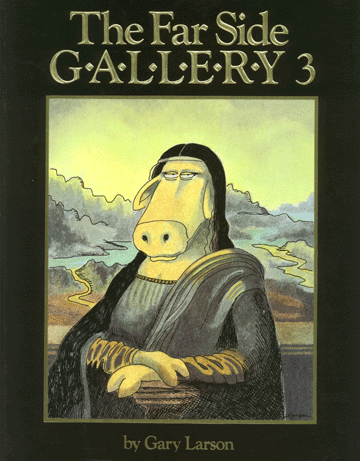
3. Create Mona Lisa Parody. Parody definition.
Mona Lisa Parody Examples
Video of burger grease Mona Lisa

1. Presentation and take notes
2. Reading about Marcel Duchamp
3. Create Mona Lisa Parody. Parody definition.
Mona Lisa Parody Examples
Video of burger grease Mona Lisa
6th Grade Digital Arts: Emotion in a PowerPoint presentation
You will work with a partner to create a PowerPoint presentation on an emotion. You will discover how to visually represent an emotion with related images and words.
Presentations don't have to be boring! For this project we will use PowerPoint to make a presentation that is interesting, artistic and entertaining.
Vocabulary
go to Word Central to find the definitions for the following words.
presentation:
emotion:
represent:
visually:
consistent:
Research
Here is an example of a good PowerPoint:
Did you Know?
This guy explains BAD PowerPoint:
Comedian Don McMillan
Design
Choose an emotion. Look for images, facts, or quotes to incorporate into your presentation. You can use the links below, or use google searches:
Presentations don't have to be boring! For this project we will use PowerPoint to make a presentation that is interesting, artistic and entertaining.
Vocabulary
go to Word Central to find the definitions for the following words.
presentation:
emotion:
represent:
visually:
consistent:
Research
Here is an example of a good PowerPoint:
Did you Know?
This guy explains BAD PowerPoint:
Comedian Don McMillan
Design
Choose an emotion. Look for images, facts, or quotes to incorporate into your presentation. You can use the links below, or use google searches:
-
Envy - Boredom
- Sadness
- Happiness
Joy
Pleasure
Calm
Content
Kindness
Hope
Trust
Images: All images must come from the Copyright free image links on the right
Quotes: Try searching your emotion and the word "quote." When you include a quote, make sure to attribute it to the author
Definitions: Start your presentation with a definition of your emotion.
Requirements:
Your presentation must be 10 slides or more.
You must have at least one photo per slide.
Your presentation should have a cohesive design.
You will present your PowerPoint to the class.


Subscribe to:
Posts (Atom)